9 Best YouTube Transcript Generators in 2026 (4 Failure Modes Tested)
We tested 9 YouTube transcript generators across uncaptioned videos, unspoken slide and code OCR, 60-minute playlist batches, and MCP agents. Compare verified Nov 2026 limits and pricing.

Editorial disclosure: Scribiz is built by the team behind Awesome Tools; competitor pricing and free-tier limits were verified on each vendor's public site in November 2026.
Seven of the ten "free YouTube transcript generators" ranking on page one of Google do not run speech recognition at all: they pull YouTube's existing XML subtitle file and fail with a blank state the moment a creator disables closed captions (CAPTIONS_MISSING). Worse, even on captioned tutorials, audio-only transcribers miss every line of Python code, terminal flag, pricing slide, and visual hook shown on screen without being read aloud. We ran nine YouTube and video transcription tools through a four-part torture test covering disabled captions, unspoken on-screen visual OCR (Listen + Watch), 60-minute lectures and playlist batches, and direct Model Context Protocol (MCP) connections into ChatGPT, Claude, and Cursor.
If you only copy spoken dialogue from a 5-minute captioned vlog once a month, YouTube's built-in "Show transcript" button or any free scraper works fine. When you research competitor demos, study hour-long engineering lectures, repurpose TikToks and Reels, or wire video context into an AI coding agent, the hidden limits show up fast.
Quick Decision Matrix: Pick by Workflow
- Best overall for YouTube links,
Listen + Watchslide OCR, CLI & MCP agents: Scribiz (first 2-hour video free without signup;$5non-expiring packs;$10/moor$84/yrPro;scribiz.com/mcp). - Best for bot-free live Google Meet, Zoom & Teams calls: Tactiq (free Chrome extension for 10 calls/mo + free web YouTube caption scraper; Pro
$8/mobilled yearly). - Best for students turning captioned playlists into mind maps & flashcards: NoteGPT (15 free basic quotas/mo; Pro
$9.99/mo). - Best flat-rate manual web uploader for huge audio file backlogs: TurboScribe (3 free 30-min uploads/day; Unlimited
$10/mobilled yearly or$20/momonthly, web UI only). - Best for 150+ languages, broadcast subtitle formats (
STL/FCPXML) & human proofreading: Happy Scribe (10 free upload mins once; Basic$8.50-$17/mo; human proofreading from$2.00/min). - Best for editing video timelines by deleting words in the transcript: Descript (60 free media mins/mo; Hobbyist
$16/moyearly). - Best for recording remote 48kHz/4K guest video podcasts: Riverside (free web caption tool; Studio Pro
$24-$29/mo, Grow$34-$39/mowith MCP). - Best for turning weekly podcast episodes into show notes & newsletters: Podsqueeze (30 free podcast mins/mo; Starter
$5.99-$8.99/mo). - Best personal-use annual credit bundle for burned-in translated subtitles: RecCloud (free first video up to 5 hrs; Basic
$48/yrpersonal-only, Business$188/yrcommercial).
4-Failure-Mode Torture Test & Verified Nov 2026 Pricing
| Tool | 1. No-Caption Audio Fallback | 2. On-Screen Visual OCR | 3. 60-Min Lecture & Batch | 4. Hosted MCP / API / CLI | Verified Free Limit | Paid Starting Price (Nov 2026) |
|---|---|---|---|---|---|---|
| Scribiz | Pass (Listen ASR) | Pass (Watch frame OCR) | Up to 2h free / 6h Pro + caption batches | MCP (scribiz.com/mcp), REST API & CLI | 1st video free (2h, no login); 30 mins/mo + 30 YT credits w/ account | $5 non-expiring pack; $10/mo ($84/yr) Pro |
| Tactiq | Fail on web tool (captions only) | No | Single URL only on web | MCP beta on $29.17/mo Business only | Free YT caption scrape; 10 live calls/mo | $8/user/mo Pro (billed annually) |
| NoteGPT | Pass (up to 120-210m) | No | Playlist URLs supported (5-20 batch on paid) | No public API, CLI, or MCP | 15 basic quotas/month | $9.99/mo Pro ($9/mo yearly) |
| TurboScribe | Pass (file/link ASR) | No | Free rejects over 30m files; 10h & 50-batch on Paid | None (manual web dashboard only) | 3 files/day up to 30 mins each | $20/mo monthly or $10/mo yearly ($120/yr) |
| Happy Scribe | Pass (link/file ASR) | No | Free capped at 10m total; unlimited length on Pro | API + MCP on paid plans | 10 upload mins once (+ 45m live calls) | $17/mo Basic ($8.50/mo yearly, 120 mins) |
| Descript | Pass (imported media) | No | 60m uses full monthly free allowance | Desktop/web NLE (no transcript MCP) | 60 media mins/month (720p) | $16/user/mo Hobbyist (billed yearly, 10 hrs) |
| Riverside | Pass (ASR in browser) | No | Single web job; studio tracks up to plan hrs | MCP on $34-$39/mo Grow+ | Free web generator; 2h studio trial once | $29/mo Pro ($24/mo yearly) |
| Podsqueeze | Pass (uploaded media) | No | Free caps at 30m/mo; 120m/mo on Starter | None | 30 podcast mins/month | $8.99/mo Starter ($5.99/mo yearly, 120 mins) |
| RecCloud | Pass (link/file ASR) | No | 1st video up to 5h; credit-metered after | None | 1st video free trial (up to 5h) | $48/yr Basic (personal only); $188/yr commercial |
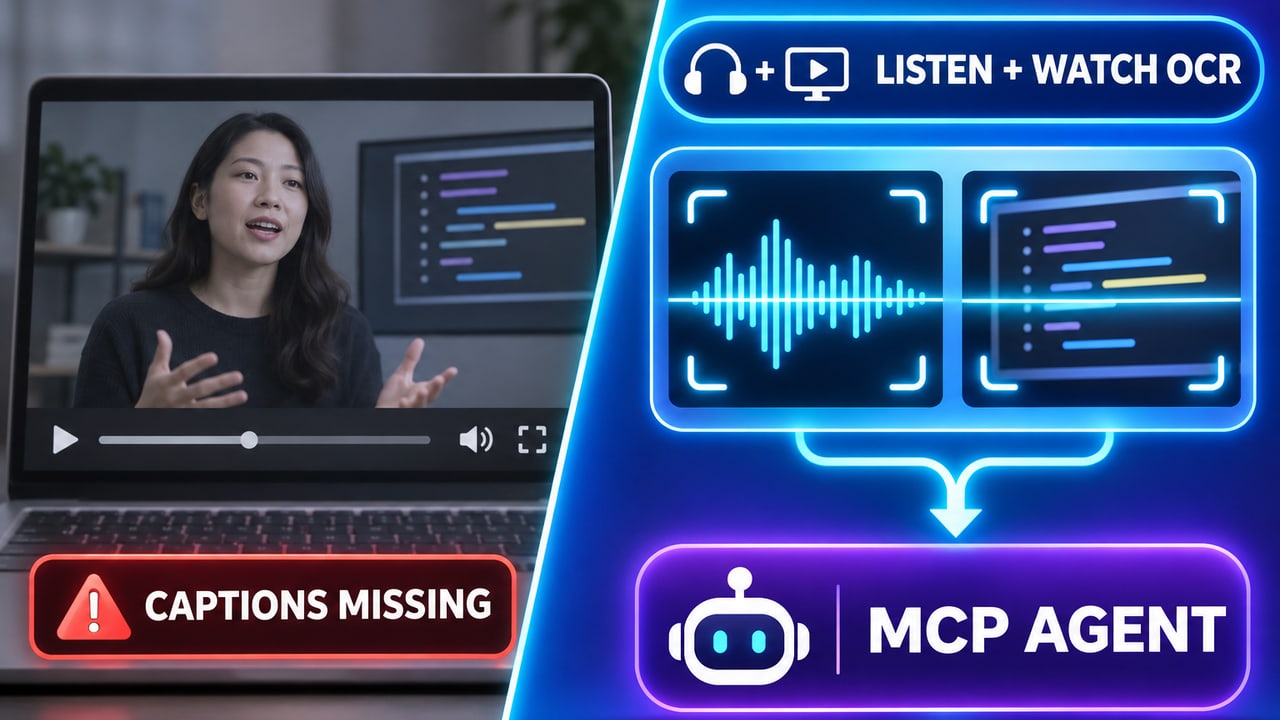
How the 4 Torture-Test Failure Modes Separate Real Tools from Scrapers
Before comparing prices across AI productivity apps, check where basic browser extractors break in real daily work:
- Failure Mode 1: Creator captions disabled (
CAPTIONS_MISSING). Many Loom-style product teardowns, unlisted cohort lectures, TikToks, Instagram Reels, and fresh YouTube uploads have zero caption track attached. Pure caption scrapers (including YouTube's native panel, Tactiq's free web widget, and lightweight Chrome extensions) return nothing unless an Acoustic Speech Recognition (ASR) engine takes over automatically. - Failure Mode 2: Unspoken slides, code, and visual hooks. Watch a 20-minute Cursor tutorial or an investor pitch teardown: the speaker says "drop this config into your file and look at row three," never reading the JSON keys or revenue numbers aloud. Audio-only Whisper wrappers miss 100% of that context. Visual frame OCR (
Watchmode) extracts the exact text on screen at each timestamp. - Failure Mode 3: 60-minute lectures and playlist/channel batches. Free tiers advertised as "3 free transcripts a day" often cap single files at 30 minutes (TurboScribe) or 10 total minutes (Happy Scribe), forcing you to slice an hour-long keynote in FFmpeg before uploading.
- Failure Mode 4: Piping video context into ChatGPT, Claude, or Cursor (
MCP). Copy-pasting a 45,000-character raw transcript into a chat window wastes context tokens and strips clickable timestamps. A remoteMCPserver lets your AI assistant search exact moments, read chapters, and inspect on-screen notes on demand.
1. Scribiz: Best Overall for YouTube, Visual Slide OCR (Listen + Watch), CLI & MCP

Transcribe spoken audio and on-screen text in any video across web, Mac, CLI, API, and MCP.

Transcribe both spoken audio and on-screen visual text (OCR) from YouTube, TikTok, Reels, or local files via web, Mac app, CLI (npm i -g scribiz), REST API, or hosted MCP server (https://scribiz.com/mcp).
Scribiz was built specifically for the four failure modes above. Paste a YouTube, TikTok, Instagram Reel, X video, or podcast URL, and Scribiz checks for clean captions first (0.1 minute cost or 1 caption credit), falls back to cloud speech-to-text (Listen, 1 min/min) when captions are missing, and adds Watch visual frame OCR (1 min/min, or Both at 2 min/min) to read unspoken slides, code editors, charts, and silent screen recordings with exact timestamps.
For developers and AI-heavy workflows, Scribiz unifies four interfaces on a single minute balance:
- Instant Web App (
scribiz.com): Process your first video up to 2 hours free with zero signup, and exportSRT,VTT,TXT,Markdown, or structuredJSON. - Hosted 14-Tool MCP Server (
https://scribiz.com/mcp): Connect Claude Code, Cursor, ChatGPT, or Codex to runget_video_context,search_video,ask_video, andstart_youtube_caption_batchacross entire playlists without pasting giant transcripts into chat. - Global CLI (
npm i -g scribiz) & REST API: Transcribe local folders, Screen Studio recordings, or remote URLs from your terminal, with optional Bring-Your-Own-Key (BYOK) Gemini support (~$0.34per hour of audio billed directly by Google). - Native macOS App: Includes offline local Apple Silicon transcription (
Parakeet v3, transcribing a 51-minute recording locally in ~18 seconds at$0cloud cost).
Verified November 2026 pricing:
- Free: First video free without login (up to 2 hours). Free account includes 30 Listen/Watch minutes/month + 30 free YouTube caption credits (1 credit per video regardless of length) + all export formats.
- Non-expiring Pay-As-You-Go Packs: Minute top-ups from
$5(never expire), plus dedicated YouTube caption packs (200 videos for$3.99, 1,200 for$11.99, 5,000 for$23.00). - Pro (
$10/monthor$84/year): 600 minutes/month (10 hours), videos up to 6 hours, interactive Video Q&A, and shared API/CLI/MCP access. - Mac Lifetime (
$99once): Lifetime macOS 1.x app, folder batching, menu bar recorder, BYOK Gemini, and 300 hosted cloud minutes.
Use another tool instead when: You need an extension that transcribes live Google Meet or Zoom calls in real time (use Tactiq), or you want to cut a video timeline by deleting filler words in a visual NLE (use Descript).
2. Tactiq: Best for Bot-Free Live Google Meet Calls (+ Quick Caption Copies)

Live Google Meet, Zoom, and Teams transcription extension with a free YouTube caption tool.

Chrome extension and meeting assistant for live Google Meet, Zoom, and Microsoft Teams transcripts, plus a free web YouTube transcript extractor.
Tactiq ranks near the top of Google for YouTube transcripts thanks to its fast, clean, no-signup free YouTube transcript page. For a single public YouTube video that already has creator or auto-generated subtitles enabled, Tactiq pulls clean paragraph-grouped text in about two seconds with zero email gate.
Know what sits underneath before relying on it for video research: Tactiq's core paid product is a bot-free Chrome extension for live Google Meet, Zoom, and Microsoft Teams calls. Its free YouTube page is a pure caption extractor with no speech-to-text fallback on uncaptioned videos, no playlist batching, and no visual slide OCR, and Tactiq's beta MCP connector is locked behind its $29.17/user/month Business tier (20-200 user bracket).
Verified November 2026 pricing:
- Free forever:
$0(unlimited single-video YouTube caption scrapes on web; 10 live meeting transcripts/month and 5 AI credits/month in the Chrome extension). - Pro:
$8/user/monthbilled annually (unlimited live meeting transcripts, 10 AI credits/mo). - Team:
$16.67/user/monthbilled annually (unlimited AI credits, shared team spaces). - Business:
$29.17/user/monthbilled annually (adds SAML SSO, Tactiq MCP beta, and Claude Connector beta).
Use Tactiq when: Your workday revolves around live Google Meet or Zoom calls where you do not want an invasive recording bot joining the participant list. Use Scribiz when you need YouTube audio fallback, visual OCR, or MCP access without an enterprise seat bill.
3. NoteGPT: Best for Students Summarizing Captioned YouTube Playlists

YouTube transcript extractor, playlist summarizer, and AI mind-map study workspace.

AI study workspace that extracts YouTube transcripts, summarizes playlists, and generates mind maps and flashcards from videos and PDFs.
NoteGPT pairs a YouTube transcript extractor with study-focused outputs: side-by-side AI summaries, auto-generated mind maps, flashcards, and inline transcript editing. In our batch test, NoteGPT stood out among consumer web apps for accepting YouTube playlist URLs directly in the browser UI (processing 5 to 20 videos at once on paid plans) and falling back to speech-to-text on uncaptioned videos up to 120-210 minutes.
The friction is NoteGPT's dual-meter billing. Actions draw from separate Basic Quotas and Premium Credits depending on whether subtitles exist, which LLM you chat with, and whether you run standard or premium transcription.
Verified November 2026 pricing:
- Free:
$0for 15 Basic Quotas/month (1 captioned YouTube transcript = 1 Basic Quota; uncaptioned YouTube = 1 Basic Quota per 10 minutes up to 120 mins). - Pro:
$9.99/month($9/mobilled yearly; 1,000 Basic Quotas/mo + 100 Premium Credits, 5 YouTube videos at once, files up to 1 GB). - Unlimited:
$29/month($19.92/moyearly; unlimited basic transcripts/summaries + 2,800 Premium Credits/mo, 10 YouTube videos at once). - Max:
$99/month($69/moyearly; 10,000 Premium Credits/mo, 20 videos at once).
Use NoteGPT when: You are a student turning captioned course playlists into mind maps and study notes inside one browser tab. Skip it if you want a developer API, CLI, MCP server, or visual code/slide OCR.
4. TurboScribe: Best Flat-Rate Whisper Uploader for Manual Audio Backlogs

Flat-rate Whisper audio and video transcription with 3 free daily uploads.

Flat-rate Whisper audio and video transcription web app with 3 free 30-minute files daily and unlimited single-user uploads on paid plans.
TurboScribe does one job with minimal UI clutter: web-based OpenAI Whisper speech-to-text across 98+ languages at a flat single-user subscription price. If you manually drag-and-drop dozens of recorded interview MP3s or MP4s into a browser every week and never touch an API or terminal, TurboScribe Unlimited ($10/mo billed yearly) is tough to beat on raw hours per dollar.
Watch two limits that trip up first-time buyers:
- The 30-minute free wall: TurboScribe's 3-per-day free tier rejects (rather than truncating) any file over 30 minutes, so a standard 60-minute podcast or lecture fails unless you split the file locally or pay.
- Manual browser workflow only: There is no public REST API, no CLI, no MCP connector, and no visual OCR for on-screen slides, and accounts exceeding roughly 720 hours/month (24 hrs/day average) move into throttled High Volume Mode.
Verified November 2026 pricing:
- Free:
$0for 3 files/day, max 30 minutes per file, 1 upload at a time, lower queue priority (email signup required). - Unlimited:
$20/monthbilled monthly, or$10/monthbilled annually ($120/year) for 1 person (files up to 10 hours / 5 GB, 50 uploads per batch, 134+ language translations). Purchases are non-refundable per vendor terms, so test on the free plan first.
Use TurboScribe when: One person needs to manually upload 30+ hours of pure spoken audio every month in a web browser. Use Scribiz when you want link-based YouTube/Reel extraction, slide OCR, $5 non-expiring packs without an annual lock-in, or CLI/MCP automation.
5. Happy Scribe: Best for 150+ Languages, Broadcast Captions & Human Proofreading

Multilingual AI transcription, broadcast subtitling, and optional human proofreading in 150+ languages.

Multilingual AI transcription, subtitling, and optional human-proofread caption platform supporting 150+ languages and broadcast subtitle formats.
Happy Scribe bridges automated AI transcription and traditional post-production subtitling workflows. Supporting 150+ languages and dialects, it includes an interactive subtitle timing editor, style guides, glossaries, broadcast exports (STL, FCPXML, EDL, VTT, SRT), EU GDPR data residency, API and MCP connectors on paid plans, and an optional 99%-accurate human subtitling service starting at $2.00/minute.
Verified November 2026 pricing:
- Free:
$0for 10 upload/link minutes once (one-time trial, not monthly) plus unlimited 45-minute live meeting recordings. - Basic:
$17/month($8.50/mobilled annually; 120 upload minutes/mo, overages at$0.20/min). - Pro:
$29/month($19/moannually; 600 upload minutes/mo, 3 seats, broadcast export formatsFCPXML/STL/EDL). - Business:
$89/month($59/moannually; 6,000 upload minutes/mo, 5 seats, unlimited glossaries). - Human proofreading add-on: From
$2.00/minute.
Use Happy Scribe when: Your video production agency delivers localized broadcast subtitles in FCPXML or STL or requires human-verified legal/medical captions. For solo YouTube research, 120 monthly minutes at $17/mo costs significantly more per minute than Scribiz Pro (600 mins for $10/mo).
6. Descript: Best When Transcription Is Step One of Timeline Video Editing
Edit video by editing the transcript.

An AI-powered video and audio editor. It transcribes your media so you can edit by changing text, not by scrubbing a timeline. Great for podcasters.
Descript leads our video editing category for text-based timeline editing: import a video, let Descript transcribe up to 8+ speakers across 25 languages, and cut the underlying video track simply by highlighting and deleting sentences or filler words in the document. Its AI co-editor (Underlord) also handles Studio Sound audio cleanup, Eye Contact correction, and vertical clip repurposing.
Verified November 2026 pricing:
- Free:
$0for 60 media minutes/month (1 hour total, 720p export). - Hobbyist:
$16/person/monthbilled annually (10 media hours/mo, 400 AI credits, watermark-free 1080p export). - Creator:
$24/person/monthbilled annually (30 media hours/mo, 800 AI credits, 4K export, stock library). - Business:
$50/person/monthbilled annually (40 media hours/mo, 1,500 AI credits, 30+ language dubbing).
Use Descript when: You are editing your own YouTube videos or podcasts for publication. Do not burn Descript media hours just to read, search, or extract notes from third-party YouTube videos.
7. Riverside: Best Remote Podcast Studio with a Free Web Caption Tool

Local-first remote podcast and video studio with AI transcription and text-based editing.

Browser-based local multi-track podcast and video recording studio with built-in AI transcription, text-based editing, and social clip generation.
Riverside is the gold standard for recording remote multi-track video interviews locally in each guest's browser (48kHz WAV audio + up to 4K video) so flaky Wi-Fi never ruins an episode. Like Tactiq, Riverside hosts a popular free no-signup browser YouTube transcript generator, and in 2026 added a Riverside MCP server on its Grow plan so Claude or Cursor can search studio recordings and cut social clips.
Verified November 2026 pricing:
- Free web tool & Free studio:
$0browser transcript page + 2 hours of multi-track studio recording once (720p, watermarked). - Pro:
$29/month($24/mobilled annually; 15 hrs/mo separate track downloads, text-based editing). - Grow:
$39/month($34/moannually; 20 hrs/mo separate tracks, live multistreaming, Riverside MCP).
Use Riverside when: You host remote guest interviews and want recording, transcription, and clip cutting under one roof. For external YouTube playlists, TikToks, visual slide OCR, or $10/mo MCP access, Scribiz is purpose-built and 70% cheaper.
8. Podsqueeze: Best for Turning Podcast Episodes into Show Notes & Clips

Turn podcast episodes and YouTube videos into transcripts, show notes, and clips.

Podcast and YouTube repurposing tool that turns episodes into transcripts, SRT subtitles, show notes, blog drafts, newsletters, and short clips.
Podsqueeze focuses on what happens after a podcast or video episode is recorded: upload an audio/video file, and it generates a full transcript, SRT captions, timestamped chapters, show notes, blog post drafts, newsletter copy, and short social clips or audiograms.
Pay attention to how Podsqueeze splits its two meters: monthly podcast source minutes and monthly video clips are capped separately. Four 45-minute episodes (180 minutes) already exceed the 120-minute Starter tier, pushing weekly long-form shows onto the $49/mo ($35/mo yearly) Pro plan.
Verified November 2026 pricing:
- Free:
$0for 30 podcast minutes/month and watermarked clip testing (no credit card). - Starter:
$8.99/month($5.99/mobilled annually; 120 mins/mo, 8 clips, 4 GB max file, no minute rollover). - Pro:
$49/month($35/moannually; 320 mins/mo, 20 clips, 10 GB max file, unused minutes roll over up to 3x). - Agency Lite:
$89/month($62/moannually; 600 mins/mo, 40 clips).
Use Podsqueeze when: You produce an audio/video podcast and want first-draft show notes, chapters, and audiograms generated from one upload.
9. RecCloud: Best Budget Credit Pool for Personal Non-Commercial Subtitles

Credit-based YouTube link transcription and AI video subtitle translator.

Credit-based AI video toolkit for YouTube link transcription, multi-language subtitle translation, and browser screen recording.
RecCloud bundles link-based YouTube transcription (1 credit/minute) with AI video subtitle generation, multi-language video translation, and screen recording inside a consumer credit wallet, and lets new users test one video up to 5 hours long for free.
Read two fine-print rules on RecCloud's pricing FAQ before buying an annual plan for work:
- Commercial license restriction: Both Basic (
$48/yr) and Pro ($59/yr) explicitly state they are for personal non-commercial use only. Monetized YouTube channels, agencies, and business workflows require the$188/yearBusiness tier. - Expiring annual credits & variable burn: Basic's 3,000 yearly credits average 250 minutes/month across the year, AI subtitle translation burns 2 to 30 credits per minute, file downloads cost 6 credits/GB, and unused membership credits void immediately if your subscription ends.
Verified November 2026 pricing:
- Free trial: First video free (up to 5 hours).
- Weekly:
$15/week(300 credits/week). - Basic:
$48/year(3,000 credits/year, personal non-commercial use only). - Pro:
$59/year(6,000 credits/year, personal non-commercial use only). - Business:
$188/year(24,000 credits/year, commercial use permitted).
Use RecCloud when: You want burned-in translated subtitles for personal hobby videos. For commercial work, developer automation, or credits that never expire, Scribiz's $5 non-expiring packs and $84/year Pro plan avoid license traps.
Which YouTube Transcript Generator Should You Pick?
- Choose Scribiz if you paste YouTube, TikTok, or Reel links, hit
CAPTIONS_MISSINGvideos, needListen + Watchvisual OCR for slides and code, or want CLI, REST API, andscribiz.com/mcpinside Claude, ChatGPT, and Cursor. - Choose Tactiq for bot-free live Google Meet/Zoom calls, Descript for text-based video timeline editing, Happy Scribe for 150-language broadcast subtitling, or TurboScribe for manual browser-only Whisper file uploads.
- Turning video research into slide decks or search-ranking guides? Pair your transcript workflow with our tested best AI presentation makers and best AI SEO tools, or browse all AI tools on Awesome Tools.